Imagine walking into a store where the sign says “Burgers,” but the staff is wearing tuxedos, the music is classical opera, and they are selling sushi. You would be confused, right? You might even turn around and leave.
That is exactly what happens when a YouTube channel has bad branding.
When a new viewer clicks on your video or visits your channel page, they need to know instantly who you are, what you do, and why they should stick around. That is the power of branding. It is not just about having a cool logo or a favorite color. It is about the “vibe” your channel gives off. The promise you make to your audience.
In this guide, we are going to break down everything you need to know to build a YouTube brand that looks professional, builds trust, and turns casual viewers into loyal subscribers.
What is YouTube Branding? (It’s More Than Just a Logo)
Before we dive into pixel sizes and color codes, let’s talk about what branding actually is. Many beginners think branding is just their profile picture. While that is part of it, your brand is actually the personality of your channel.
Think of your favorite YouTubers. When you see their thumbnail, you know it’s them before you even read the title. When they start talking, you know exactly what kind of energy to expect. That is successful branding.
Your branding consists of three main pillars:
- Visual Identity: How your channel looks (Colors, fonts, logos, thumbnails).
- Voice and Tone: How your channel sounds (Your writing style, your energy, your catchphrases).
- Values: What your channel stands for (Education, comedy, inspiration, honesty).
If you are just starting your channel from scratch, getting these pillars right from day one will save you a lot of time later.
The Visual Essentials: Your Channel’s “Outfit”
Your visual branding is the first thing people see. If your visuals are messy, people will assume your content is messy, too. Let’s look at the specific assets you need to create.
1. The Channel Banner (Your Billboard)
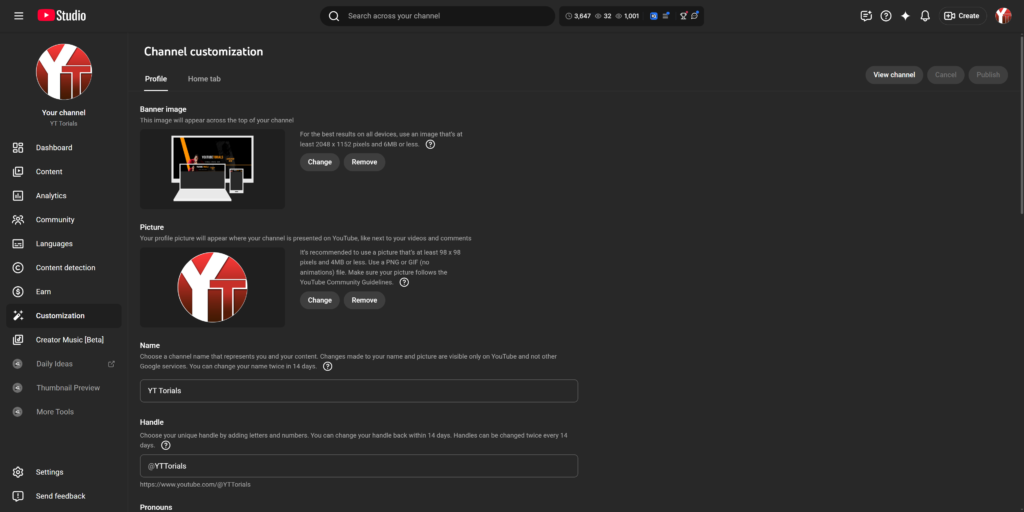
Your channel banner (also called “Channel Art”) is the huge image at the top of your profile. This is prime real estate. It is the only place on YouTube where you have total creative control to tell people who you are.
What should be on your banner?
- Your Channel Name: Big and bold.
- Your Value Proposition: A short phrase that explains what you do (e.g., “Tech Reviews for Non-Techies” or “Vegan Cooking in 15 Minutes”).
- Upload Schedule: If you post every Tuesday, say so! It builds habit.
- Social Handles: Let people know where else to find you.
The Tricky Part: Sizing YouTube banners are tricky because they look different on a TV, a computer, and a phone. You need to design your banner so the important stuff is in the “Safe Zone” (the middle part that shows up on mobile phones).
- TV Display: 2560 x 1440 pixels (The whole image).
- Desktop Display: 2560 x 423 pixels (A wide strip).
- Mobile/Safe Zone: 1546 x 423 pixels (The center box).
Tip: Always double-check your design against the official YouTube image size guidelines to make sure your text doesn’t get cut off.
2. The Profile Picture (Your Avatar)
Your profile picture (or “icon”) is the face of your brand. It appears next to every comment you write and every video you post.
For personal brands (vloggers, educators, influencers), your profile picture should almost always be a high-quality photo of your face. Humans connect with humans, not graphics. Make sure you are smiling and looking at the camera.
For company brands (agencies, software, businesses), a high-contrast version of your logo works best.
Quick Specs:
- Size: 800 x 800 pixels.
- Format: JPG, GIF, BMP, or PNG.
- Crop: YouTube will crop this into a circle, so don’t put anything important in the corners!
3. Video Thumbnails (The Click Magnet)
If your banner is your billboard, your thumbnails are your movie posters. This is the most critical visual element for getting views.
A branded thumbnail strategy means that all your thumbnails look like they belong to the same family. You don’t want them to look identical, but they should share a “style.”
How to brand your thumbnails:
- Consistent Fonts: Pick one or two fonts and use them every time. Do not switch from Comic Sans to Impact to Arial every week.
- Color Palette: Use your brand colors as accents (borders, text background, or clothing).
- Face Emotions: If your face is in the thumbnail, exaggerate your expression to match the video topic (excited, confused, serious).
- Composition: Try to keep your layout somewhat consistent. For example, maybe your face is always on the right and text is always on the left.
If you want to learn more about ranking your videos, mastering thumbnails is step one because a high click-through rate tells YouTube your video is worth watching.
4. The Watermark
This is a small, often overlooked feature. In your YouTube Studio settings, you can upload a tiny image that sits in the bottom right corner of your videos. When viewers hover over it, they get a “Subscribe” button.
- Pro Tip: Don’t just use your logo here. Use a graphic that actually says “SUBSCRIBE” or has a subscribe icon. It acts as a Call-to-Action (CTA) throughout the whole video.
The “Invisible” Branding: Voice, Tone, and Music
Branding isn’t just what we see; it’s what we hear and feel.
Your Voice and Scripting
How do you talk to your audience? Are you a strict teacher? A goofy best friend? A sarcastic commentator?
This is called your “Tone of Voice.” You should try to keep this consistent. If you are usually funny and lighthearted, a suddenly dark and serious video might confuse your audience (unless there is a good reason for it).
Common YouTube Tones:
- The Expert: “Here is exactly how this works, step-by-step.” (Authoritative, clear).
- The Explorer: “I don’t know what’s going to happen, let’s find out together!” (Curious, energetic).
- The Buddy: “You won’t believe what happened to me today.” (Relatable, casual).
Define your tone and write your scripts to match. If you hire a scriptwriter later, having a “Brand Voice Guide” will help them write like you.
Music and Sound Effects
Have you ever heard a specific sound effect and immediately thought of a specific YouTuber? That is “Audio Branding.”
You don’t need to commission an original theme song, but you should have a library of “go-to” songs and sounds.
- Intro Music: Use the same 3-5 seconds of music at the start of every video.
- Background Music: Pick a specific genre. If you are a tech channel, lo-fi beats or electronic music might fit. If you are a gardening channel, acoustic guitar might be better.
- Sound Effects: Use specific “whooshes” or “pops” for your text transitions. Over time, your audience will subconsciously associate those sounds with your content.
Optimizing Your Channel Layout
When someone clicks on your channel name, they land on your homepage. This page needs to be organized. You wouldn’t invite guests into a messy house, so don’t invite viewers to a messy channel.
The Channel Trailer
This is a video that auto-plays for people who haven’t subscribed yet. You have two options here:
- The “Pitch” Video: A 60-second video specifically made to welcome new viewers. “Hi, I’m [Name], and on this channel, we talk about [Topic]. Subscribe for new videos every Tuesday!”
- Your Best Video: If you don’t want to make a trailer, set your absolute best, most high-performing video as the trailer. It serves as a great first impression.
Playlists
Playlists are an underrated branding tool. They help you organize your content into “shows” or “series.”
Instead of a generic playlist called “My Videos,” use branded names.
- Bad Name: “Cooking Videos”
- Branded Name: “Budget Eats: Meals Under $5”
- Bad Name: “Travel Vlogs”
- Branded Name: “Lost in Europe: 2026 Adventures”
This makes your content feel like a premium TV network rather than a random folder of files.
Consistency is Key (The Secret Sauce)
If you take only one thing away from this guide, let it be this: Consistency is more important than perfection.
It is better to have a “pretty good” brand that shows up every single week than a “perfect” brand that changes its colors and style every month. Consistency builds trust. When people trust you, they buy from you, listen to you, and share your content.
According to marketing data, consistent presentation of a brand has been seen to increase revenue by up to 23%. Even though you are a creator, you are also a business. That same logic applies to your view counts and subscriber growth.
How to stay consistent:
- Create Templates: Make a Canva or Photoshop template for your thumbnails so you don’t have to start from scratch every time.
- Stick to a Schedule: Reliability is part of your brand. If you say you post on Fridays, post on Fridays.
- Create a Brand Guide: Write down your hex color codes, your font names, and your logo rules. Save it in a document so you (or your editor) never forget.
The “About” Section: Your Brand Story
The “About” tab on your channel page is often ignored, but it is great for SEO (Search Engine Optimization). YouTube scans this text to understand what your channel is about.
How to write a branded About section:
- The Hook: Start with a strong sentence about the value you provide. “Helping gamers get better at FPS games.”
- The Story: Briefly explain who you are and why you are qualified to talk about this.
- The Schedule: Remind them when you post.
- The Call to Action: Tell them to subscribe or join your newsletter.
- Keywords: Naturally include words people might search for to find your content.
If you want to ensure your production value matches your new professional branding, check out our guide on the best equipment for YouTube. A great brand deserves great audio and video quality!
Conclusion
Building a YouTube brand doesn’t happen overnight. It takes time to find your voice and refine your visual style. However, if you follow the steps in this guide—creating a strong visual identity, maintaining a consistent tone, and organizing your channel professionally—you will be miles ahead of the competition.
Remember, your brand is the promise you make to your audience. Keep that promise in every video, every thumbnail, and every comment, and your community will grow.
Ready to take your YouTube channel to the next level? Don’t miss out on our latest tips and strategies. Subscribe to the YT Torials newsletter today to get exclusive guides and creator tools delivered straight to your inbox!

No responses yet