
YouTube is more than just a place to watch funny cat videos or catch up on the latest gaming trends. For millions of creators, it is a serious business. If you are thinking about starting a channel, or if you already have one, you probably have one big question: “How much does YouTube pay?” The answer isn’t a simple number. In fact, it changes a lot depending on what kind of videos you make.
In this guide, we will break down exactly how much YouTube pays in ad revenue for different categories. We will look at why some topics earn way more money than others and how you can pick the right niche to maximize your earnings.
How Does YouTube Pay Creators?
Before we dive into the specific numbers, it is important to understand how the money actually works. YouTube does not pay you just for uploading a video. Instead, you earn money when people watch the ads on your videos. This is part of the YouTube Partner Program.
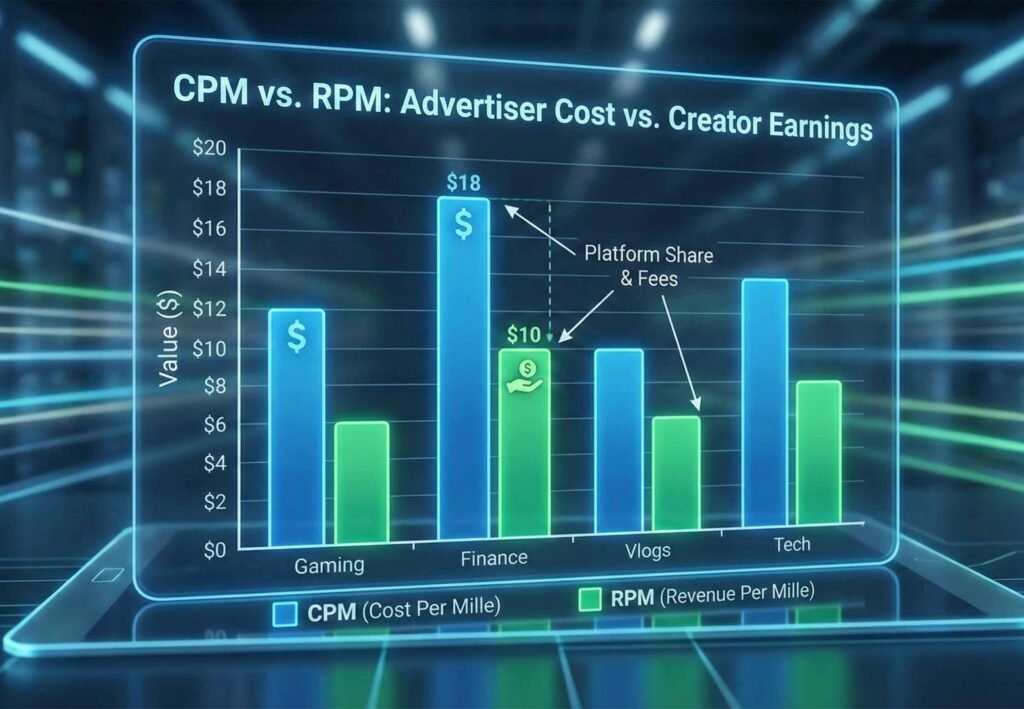
There are two main terms you need to know: CPM and RPM.
- CPM (Cost Per Mille): This stands for “Cost Per Thousand.” It is the amount advertisers pay YouTube for every 1,000 times their ad is shown.
- RPM (Revenue Per Mille): This stands for “Revenue Per Thousand.” This is the number that matters most to you. It is how much money you actually take home per 1,000 views after YouTube takes its cut.
Note: YouTube usually takes about 45% of the ad revenue, leaving you with 55%. So, if an advertiser pays a CPM of $10, your RPM (what you earn) might be around $5.50.
Why Do Some Categories Pay More?
You might wonder why a finance video earns more than a prank video. It all comes down to the advertisers. Companies that sell expensive things, like software, insurance, or mortgages, are willing to pay a lot of money to reach the right people. On the other hand, companies selling apps or snacks might pay less.
Therefore, if your audience is interested in buying expensive products, advertisers will compete to show ads on your channel. This competition drives up your CPM and puts more money in your pocket.
High-Paying YouTube Categories (The “Gold Mine” Niches)
If your main goal is to earn high ad revenue, these are the categories you should look at first. These topics attract advertisers with deep pockets.
1. Make Money Online & Affiliate Marketing
This is consistently one of the highest-paying niches on YouTube. Advertisers here are selling courses, web hosting, and business tools. They know that a viewer watching a video on “How to Start a Business” is likely to spend money to get started.
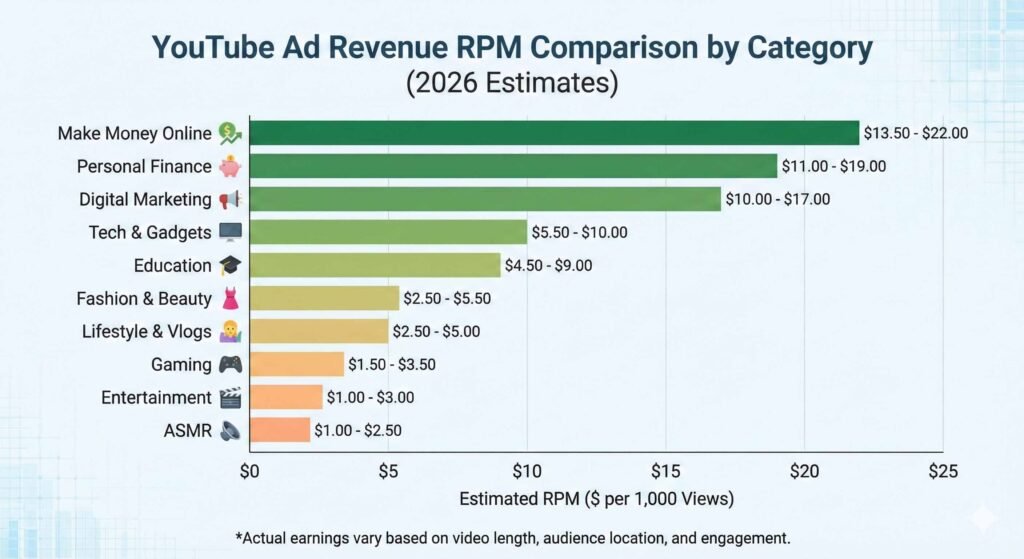
- Estimated RPM: $12 – $22+
- Why it pays well: Viewers are looking to invest in their future, making them high-value targets for ads.
2. Personal Finance & Investing
Videos about saving money, investing in stocks, or managing debt are incredibly profitable. Banks and investment firms pay top dollar to reach this audience.
- Estimated RPM: $10 – $20
- Why it pays well: Financial services are expensive and have high customer lifetime value.
3. Digital Marketing & Social Media
If you teach people how to grow on Instagram, run Facebook ads, or improve their SEO, you are in a high-paying bracket.
- Estimated RPM: $8 – $18
- Why it pays well: Business owners watch these videos, and B2B (business-to-business) advertising is very expensive.
Pro Tip: If you want to dive deeper into growing your channel, check out our guide on increasing your channel’s visibility to get started on the right foot.
Medium-Paying Categories (Steady & Reliable)
These categories have a massive audience. While the pay per view is lower than the finance niche, you can make up for it by getting significantly more views.
4. Tech, Cars, & Gadgets
Reviewing the latest iPhone or a new electric car attracts a lot of viewers. Tech companies love to advertise here.
- Estimated RPM: $4 – $8
- Why it pays well: Electronics and cars are pricey consumer goods.
5. Education & How-To
From teaching math to showing people how to fix a leaky faucet, educational content is evergreen (meaning it stays relevant for a long time).
- Estimated RPM: $3 – $7
- Why it pays well: Educational software and universities often advertise on these videos.
6. Lifestyle & Vlogs
This is a very broad category. It includes travel vlogs, daily routines, and family channels. Because the audience is so general, advertisers pay less per view.
- Estimated RPM: $2 – $4
- Why it pays well: Volume is key here. You might not earn much per view, but viral vlogs can get millions of views quickly.
Lower-Paying Categories (Volume Is King)
These niches are often the most fun and entertaining, but they typically have the lowest ad rates. To make a full-time income here, you generally need a very high number of views.
7. Gaming
Gaming is huge on YouTube, but it is also very crowded. Because the audience is often younger, advertisers are not willing to pay as much.
- Estimated RPM: $1 – $3
- Why it pays lower: Many viewers are kids or teens without credit cards, so the ads are for cheaper items like mobile games.
8. Entertainment, Pranks, & Comedy
These videos are designed to go viral. However, because the content isn’t focused on a product or service, the ads are usually very generic.
- Estimated RPM: $1 – $3
- Why it pays lower: Advertisers can’t target a specific buyer intent easily.
9. ASMR & Relaxation
While very popular, these videos often have lower ad rates. Sometimes, advertisers worry about placing loud ads in the middle of a quiet relaxation video.
- Estimated RPM: $1 – $2.50
- Why it pays lower: It is a passive viewing experience, and viewers are less likely to click on ads.

How to Maximize Your Revenue
Even if you are in a lower-paying niche, there are ways to boost your income.
- Make Longer Videos: Videos over 8 minutes long can have “mid-roll” ads (ads in the middle of the video). This means you can show more ads per viewer.
- Target a Specific Audience: Instead of just “Gaming,” try “Tech Reviews for Gamers.” This might attract higher-paying tech sponsors.
- Diversify: Do not rely only on ads. You can also make money through sponsorships and merchandise. In fact, I have a series on sponorships that you can read about here.
Furthermore, remember that your location matters. Views from countries like the USA, UK, and Australia generally pay more than views from other regions. This is simply because advertisers in those countries have larger budgets. According to data from the Influencer Marketing Hub, the geography of your audience is a top factor in determining your final paycheck.
For a broader look at the digital economy, you can also check out statistics from Statista to see global advertising trends.
YouTube Categories & Ad Revenue Table (2026 Estimates)
| Category | Estimated CPM (Advertiser Pays) | Estimated RPM (You Earn) |
| Make Money Online | $25.00 – $40.00 | $13.50 – $22.00 |
| Personal Finance | $20.00 – $35.00 | $11.00 – $19.00 |
| Digital Marketing | $18.00 – $32.00 | $10.00 – $17.00 |
| Tech & Gadgets | $10.00 – $18.00 | $5.50 – $10.00 |
| Education | $8.00 – $16.00 | $4.50 – $9.00 |
| Lifestyle & Vlogs | $5.00 – $9.00 | $2.50 – $5.00 |
| Fashion & Beauty | $5.00 – $10.00 | $2.50 – $5.50 |
| Gaming | $3.00 – $6.00 | $1.50 – $3.50 |
| Entertainment | $2.00 – $6.00 | $1.00 – $3.00 |
| ASMR | $2.00 – $5.00 | $1.00 – $2.50 |
(Note: These figures are estimates based on 2025-2026 data. Actual earnings can vary based on your specific video length, viewer location, and engagement.)
Conclusion
YouTube ad revenue varies wildly depending on what you talk about. A finance channel might make $15 for every 1,000 views, while a gaming channel might only make $2. However, both can be successful. The key is to choose a topic you are passionate about so you can stay consistent.
Whether you are chasing the high RPM of the business world or the viral fame of entertainment, there is space for you. Just remember to be patient, keep learning, and creating quality content.
Ready to take your channel to the next level? Subscribe to the YT Torials newsletter for weekly tips, and don’t forget to subscribe to the YT Torials YouTube page!
Motion Array is a subscription-based digital marketplace built specifically for video editors, independent filmmakers, and digital content creators. Instead of charging per asset like traditional media sites, it utilizes an unlimited download model. Artlist acquired the platform, and it has expanded rapidly. It now hosts millions of video assets, sound files, photos, and project templates under a single roof.
For solo creators, small agency teams, and freelance videographers, the core value proposition is consolidation. As a content creator, I can definitely say that having everything in one place to search for assets definitely is a time saver. By removing the financial friction of buying individual assets a la carte, it encourages experimentation and helps maintain visual consistency across large volumes of published work.
Core Features and Asset Library
The platform hosts over two million digital files. Because quality varies wildly on massive stock websites, platform curation remains a primary focus.
- Video Templates: Motion Array started primarily as a template hub and remains an industry leader for Premiere Pro, After Effects, DaVinci Resolve, and Final Cut Pro. Whether you need lower thirds, kinetic typography, dynamic openers, or complex data visualization elements, the template structure heavily accelerates assembly time.
- Stock Footage: Members gain access to HD and 4K clips spanning diverse categories, from cinematic drone aerials to lifestyle b-roll, corporate setups, and specialized slow-motion captures.
- Music and Sound Effects: A vast library of royalty-free tracks and punchy sound effects simplifies audio sweetening, eliminating the need to cross-shop multiple standalone audio subscription networks.
- Photos and Graphics: Beyond standard video elements, the catalog includes vectors, stock photos, icons, and color grading LUTs designed to give footage a unified cinematic grade.
For a granular breakdown of how these assets stack up against rival repositories, see our detailed guide on Motion Array vs. Envato Elements.
Workflow Realities for Micro-Creators
Motion Array serves as a strong platform for a micro-creator looking to get professional assets. The price point might feel a bit more expensive when you are first starting out in content creation, but because it delivers a polished, professional look to your brand, it can easily be worth the investment if your budget allows.
When acquiring new subscriptions, habits can sometimes shift. For instance, when I first got Motion Array, I tried to download as much as I possibly could, even if I knew I wasn’t going to use the assets anytime soon. Creators often see something appealing and think, “Maybe I’ll use this later down the line, even if it is six months from now.” Grabbing those files immediately ensures you do not have to hunt for them later.
Managing this digital hoarding habit effectively requires disciplined local caching and clean folder structures—practices further explored in our guide on how to organize a high-performance editing workflow.
Plugins and Software Integrations
Efficiency defines modern editing pipelines. Motion Array bridges the gap between web browsing and timeline editing through dedicated native extensions.
“Using native extensions allows creators to search, preview, and import assets directly inside Adobe Premiere Pro and After Effects without opening an external web browser.”
This direct integration cuts context-switching down significantly. Furthermore, some assets are easier to implement than others. You will find simple transitions that drop right into Premiere Pro where you can drag and drop them directly into your sequence, whereas others require more steps involved to get them to work correctly, such as modifying Essential Graphics text parameters or linking After Effects Mogrt templates.
For a broader look at timeline optimization tools, check out our review of essential video plugins every creator needs.
Collaboration and Portfolio Tools
The platform goes beyond a standard asset library by including workflow tools tailored for freelancers and small teams.
- Video Review Tool: Creators can upload rough cuts, share custom-branded review links with clients, and gather frame-accurate timestamped feedback. This minimizes the back-and-forth friction of timecodes sent via messy email chains.
- Portfolio Builder: Members who lack web design experience can quickly spin up a clean, professional video portfolio website hosted directly through the platform, showcasing their best reels and client work under a customized layout.
Detailed Pricing Plans Breakdown (Annual vs. Month-to-Month)
Understanding the financial commitment helps determine if the platform fits your production scale. A key friction point for freelancers is the distinction between annual commitments and month-to-month flexibility. As with monthly and yearly subscriptions, it’s always nice to try something out to see if it’s a good fit for where you are right now as a content creator versus paying for the whole year, even if you will get a discount.
Evaluating the cost-benefit analysis comes down to volume. If you routinely purchase individual After Effects templates ($20 to $50 each) or stock music licenses ($15+ per track), the annual Everything Plan pays for itself within just a handful of completed projects.
Understanding Digital Asset Licensing & Post-Cancellation Guardrails
Navigating commercial licenses can be tricky for independent creators. Motion Array uses a straightforward blanket commercial license model, meaning anything downloaded and utilized during an active subscription is cleared for commercial use indefinitely on that project.
However, strict post-cancellation guardrails apply:
- Published Projects: Any video or asset rendered, published, or baked into a completed project while your subscription was active remains legally protected forever. You do not need to take down videos if you cancel.
- New Projects: You lose the right to pull fresh assets or use un-rendered, archived raw project files downloaded from the platform in new commercial client projects once your billing cycle lapses.
For a comprehensive legal perspective on digital asset management, see our deep-dive on understanding digital asset licensing for freelancers.
Direct Platform Competitor Comparison
To evaluate where Motion Array stands in the broader market, it helps to review its primary alternative:
- Motion Array vs. Envato Elements: While Envato Elements boasts a massive 26+ million total asset catalog that includes web templates, fonts, and 3D graphics, Motion Array wins decisively on video-first curation, integrated client review tools, and native Adobe timeline extensions. If your focus is strictly video production, motion graphics, and post-production workflow speed, Motion Array offers a cleaner, more streamlined user interface.
Pros and Cons
Every platform carries unique strengths and drawbacks. Weighing these factors helps ensure you pick the right tool for your setup.
Pros:
- Truly unlimited downloads subject to a high daily cap designed to prevent automated web scraping.
- Simple, straightforward commercial licensing that covers completed projects perpetually.
- Seamless timeline integration for Adobe applications via native panels.
- Extra utility features like client review links and portfolio hosting that save money on third-party SaaS tools.
Cons:
- Downloaded assets cannot be used in new commercial projects if you cancel your subscription.
- Month-to-month pricing options carry a significant markup compared to annual commitments.
- Plugins are optimized primarily for Adobe products, leaving non-Adobe editors (like DaVinci Resolve or Final Cut Pro users) with fewer direct workflow perks.
- Single assets are unavailable for a la carte purchase for users who only want one specific file.
Frequently Asked Questions (FAQ)
Can I use Motion Array assets for monetized YouTube channels?
Yes. The standard commercial license covers YouTube monetization, client work, social media platforms, and corporate projects, provided the assets are integrated into a larger creative work rather than redistributed standalone.
Are the sound effects and music tracks truly royalty-free?
Yes. All audio files cleared through the platform are royalty-free, meaning you will not face copyright strikes or content ID claims on platforms like YouTube or Vimeo when your subscription is active.
Can I share a single individual account with my editing team?
Individual plans are licensed for single users. If multiple editors need access to shared asset libraries, centralized billing, and admin controls, you must upgrade to the Team Plan.
Final Verdict
Motion Array delivers immense value for active video creators, independent freelancers, and small agencies. Despite larger library sizes elsewhere, Motion Array leads with curated quality, a clean interface, and built-in collaboration features. If you regularly pull in templates, stock clips, or royalty-free audio, the Everything Plan pays for itself within just a few projects.
Ready to streamline your video production workflow and explore advanced editing resources? Dive deeper into professional strategies by reading our guide on how to organize a high-performance editing workflow and check out our breakdown of essential video plugins every creator needs. To receive weekly tips, industry news, and creator breakdowns directly in your inbox, make sure to subscribe to the YT Torials newsletter.

No responses yet