
If you create content online, you know the struggle. The beast needs feeding constantly. YouTube videos, Instagram Reels, blog headers, client presentations—it never stops. If you’re a designer, video creator, or podcaster, you probably already know Envato Elements.
It’s arguably the best value in the digital asset world—a treasure trove of stock videos, music, graphics, and more. But guess what? Envato Elements is making things even easier and faster for creators by adding some really cool Artificial Intelligence (AI) tools.
Think of AI not as a robot taking your job, but as a super-smart intern who handles the boring stuff so you can focus on the fun parts. Envato Elements isn’t just about providing assets anymore; it’s about helping you make them.
Here is a deep dive into how Envato Elements is using AI to supercharge your workflow.
The New AI Toolkit: A Deep Dive
Envato has integrated a suite of “Gen AI” (Generative AI) tools directly into their platform. The biggest advantage here is convenience. You don’t need five different subscriptions for five different AI tools. They are all right here.
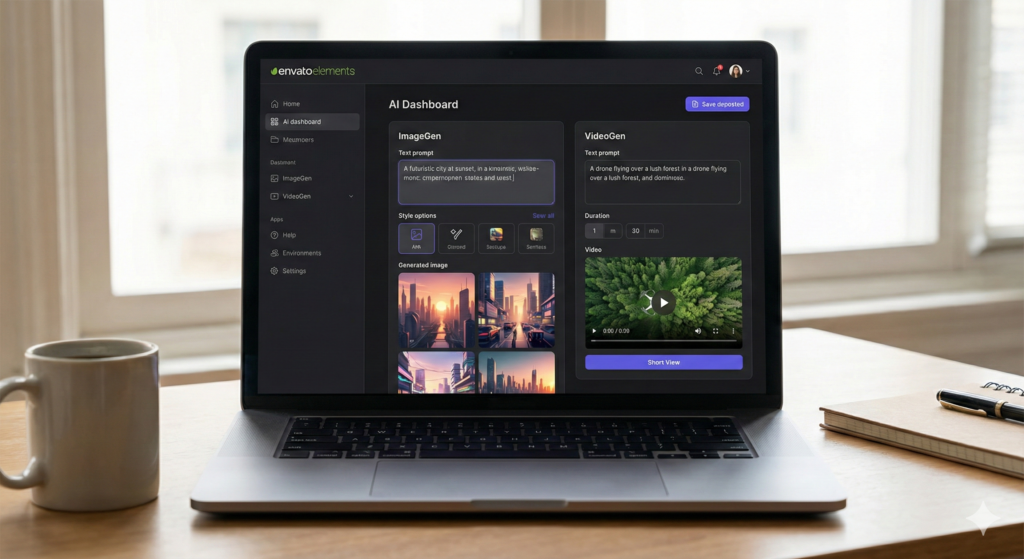
1. ImageGen: Your Instant Art Studio
Ever needed a specific image but couldn’t find the perfect one in the stock library? Maybe you need “a cyberpunk barista serving coffee to a robot.” Good luck finding that in a standard search.
With ImageGen, you can simply type in what you’re looking for, and the AI will generate unique images for you in seconds.
- How it works: Type a prompt like “a futuristic city at sunset” or “a playful cartoon cat reading a book.”
- Why it helps: You can choose different styles (photorealistic, 3D render, drawing) and aspect ratios. It is a fantastic way to get quick visuals for blog posts or social media thumbnails without scouring the web for hours.
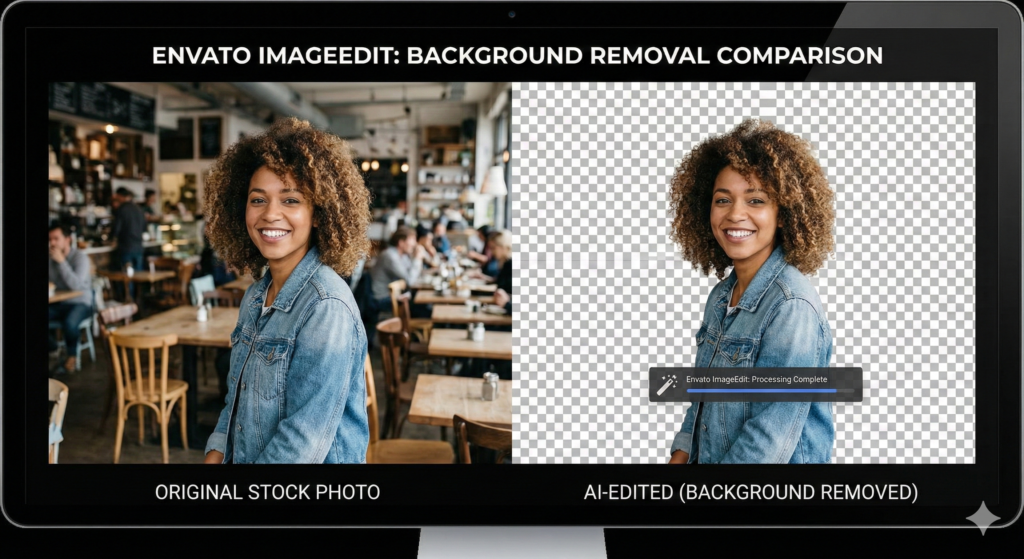
2. ImageEdit: Quick Fixes Made Easy
Sometimes, you find a stock photo that is almost perfect, but not quite. Maybe the model is standing in front of a messy wall, or the photo is too small for your 4K video. That’s where ImageEdit comes in.
This tool acts like a magic wand for your images:
- Remove backgrounds: Instantly cut out subjects from images (perfect for YouTube thumbnails).
- Crop and resize: Get the perfect dimensions for Instagram Stories or Facebook banners without fuss.
- Erase unwanted objects: Magically make distractions disappear.
- Upscale images: Improve the quality and resolution of smaller images without making them blurry.
3. VoiceGen: Give Your Text a Voice
Need a voiceover for a short video, presentation, or explainer? VoiceGen can turn your written text into spoken audio.
While it’s best for shorter clips (there is usually a character limit per generation), it is incredibly useful for:
- Mockups: Testing a script before hiring a real actor.
- Social Media: adding narration to TikToks or Reels without recording your own voice.
- Accessibility: Turning blog posts into listenable audio snippets.
The quality is surprisingly good, offering various accents and tones, making it ideal for drafts or quick content.
4. VideoGen: From Words to Moving Pictures
This is one of the most exciting additions. VideoGen allows you to create videos from text prompts and even still images.
Imagine typing “a drone shot of a foggy mountain range” and having the AI generate a basic video clip for you.
- New Feature: You can now upload a still image and ask the AI to animate it. This is perfect for bringing static photos to life for social media ads.
- Reality Check: It is still evolving. Don’t expect a Hollywood movie. But for creating quick social media textures, backgrounds, or B-roll that doesn’t exist yet, it is a game-changer.
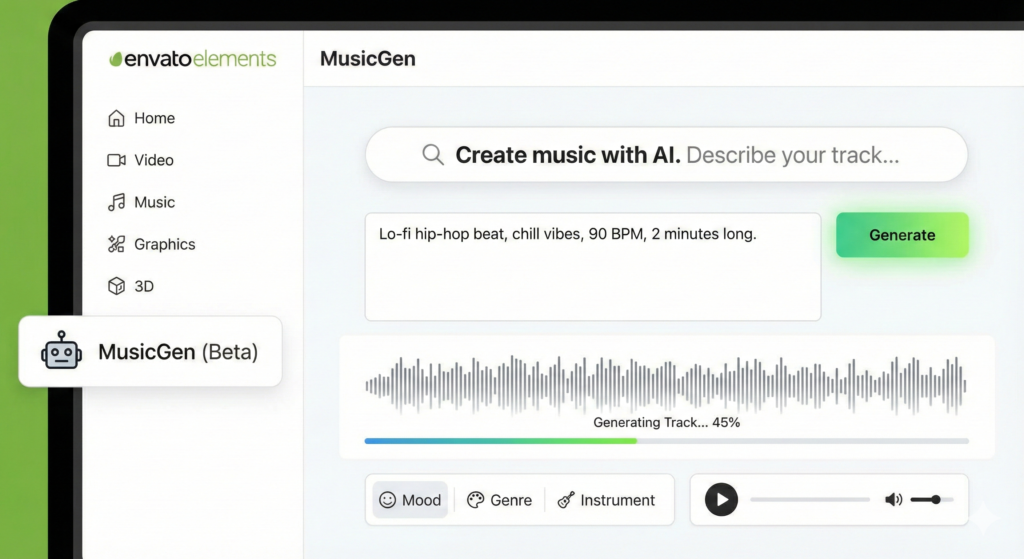
5. MusicGen: Create Custom Soundtracks
Forget endless searching for the perfect music track that ends exactly at 30 seconds. MusicGen lets you create original music using text prompts.
You can specify the mood (e.g., “Sad,” “Epic”), the genre (e.g., “Lo-fi,” “Orchestral”), and the length. This is a massive help for YouTubers who need background music that fits a specific vibe but can’t find it in the standard library.
6. GraphicsGen: Icons and Illustrations
A newer addition to the family is GraphicsGen. If you need a specific icon, vector-style illustration, or sticker, this tool can handle it. It is distinct from ImageGen because it focuses on graphic design elements rather than full photographic scenes.
The Big Benefits of Envato Elements AI
Why use these tools instead of competitors like Midjourney or ElevenLabs?
- Included in Subscription: This is the biggest selling point. Many standalone AI tools cost $20-$30/month each. These are included in your standard Envato Elements subscription.
- Unlimited Possibilities: With the ability to generate unique content, you have an endless supply of creative elements at your fingertips.
- Commercial Safety: Envato has built these tools with commercial use in mind (more on that below).
- Simplify Workflow: Having these tools integrated means you can find assets and create new ones all in one place. No more tab-switching.
Can I Sell AI-Generated Images? (The Legal Stuff)
This is the most common question we get. If you use ImageGen to make a picture, can you sell it?
The Short Answer: No, you cannot sell the raw AI image as a standalone product.
The Long Answer: The rule is in place because AI models are trained on the intellectual property of many creators. Because of this, Envato (and US Copyright law) generally says you cannot sell an item where the main component—the core of the product—was generated by an AI.
What you CANNOT do:
- Generate a picture of a dog and sell it as a “Stock Photo” on a website.
- Generate a song and sell it on iTunes.
- Generate a book using text AI and sell it on Amazon without significant editing.
What you CAN do (The “End Product” Rule): You can use AI content if it is part of a larger “End Product” where you have applied skill and effort.
- Example: You generate a background image of a forest using ImageGen. You then overlay your own video footage, add text, and color grade it to create a YouTube intro. This is allowed.
- Example: You use MusicGen to make a track, then use that track as background music for your podcast. This is allowed.
Always check the specific Envato License Terms before starting a commercial project to ensure you remain compliant.
Real-World Workflows: Putting it Together
How does this actually look in a daily routine? Let’s say you are running a YouTube content strategy for a client.
- Scripting: You write a script for a Short.
- Voiceover: You are sick, so you use VoiceGen to read the intro hook.
- Visuals: You need a clip of a “golden retriever flying a plane” (don’t ask). It doesn’t exist on best stock video sites, so you use VideoGen to create it.
- Graphics: You need a transparent PNG of a pilot’s hat to overlay on the dog. You use ImageGen to make the hat, then ImageEdit to remove the background instantly.
- Music: You need a 15-second upbeat lo-fi track. MusicGen creates it to the exact length you need.
You just saved hours of searching and hiring, all within one browser tab.
What’s Next for Envato Elements AI?
AI technology is moving incredibly fast. Envato Elements is clearly committed to being at the forefront. We can expect these tools to get even smarter, faster, and offer more control and customization in the future.
We are already seeing the introduction of “Labs” where they test beta features. Imagine even more advanced video generation that rivals real footage, or AI that can automatically streamline your editing workflow by cutting generic footage to music beats automatically.
Envato Elements AI isn’t just a trend; it’s a powerful evolution in how creators will work. By putting these intelligent tools directly into your hands, Envato Elements is empowering you to create more, faster, and with even greater flexibility. So, dive in and see how AI can transform your creative projects!
Conclusion
Things are changing, and tools like Envato Elements are making sure creators don’t get left behind. Whether you are a seasoned pro or just starting, these AI integrations offer a massive boost to productivity.
If you found this breakdown helpful and want to stay ahead of the curve with the latest creator tools, tips, and strategies, subscribe to the YT Torials newsletter. We send out weekly guides just like this one to help you master your content game.

No responses yet