
When a viewer clicks on your channel name after watching one of your videos, they enter a critical evaluation phase. They are no longer just deciding whether they liked that single video; they are evaluating whether your entire channel is worth following.
Most creators treat their YouTube homepage as a passive gallery—a random collection of recent uploads and default shelves. However, top-performing channels treat their homepage as a high-converting landing page. Every section, playlist, and trailer is deliberately placed to guide the viewer deeper into a binge-watching loop, maximizing watch time and turning casual clicks into permanent subscriptions.
If you are building your presence from the ground up, start by reviewing how to start a YouTube channel: the ultimate guide for 2026. Once your foundation is established, optimizing your homepage layout becomes the single most effective way to retain the audience you work so hard to attract.
The Two-Front Architecture: Branding vs. Layout
To build a high-converting channel page, it helps to distinguish between Visual Branding and Homepage Layout Architecture:
- Visual Branding focuses on aesthetics—your banner dimensions, profile picture, color consistency, and watermark setup. For a deep dive into graphic identity, consult the ultimate YouTube branding guide: how to stand out.
- Homepage Layout Architecture focuses on viewer navigation and session retention—how your videos, playlists, shelves, and featured sections are ordered within YouTube Studio.
While visual identity creates the initial impression of quality, layout structure dictates viewer behavior. A beautifully designed banner might capture attention, but an organized layout keeps viewers watching.
Step 1: Optimizing the Top Funnel (Channel Trailer vs. Featured Video)
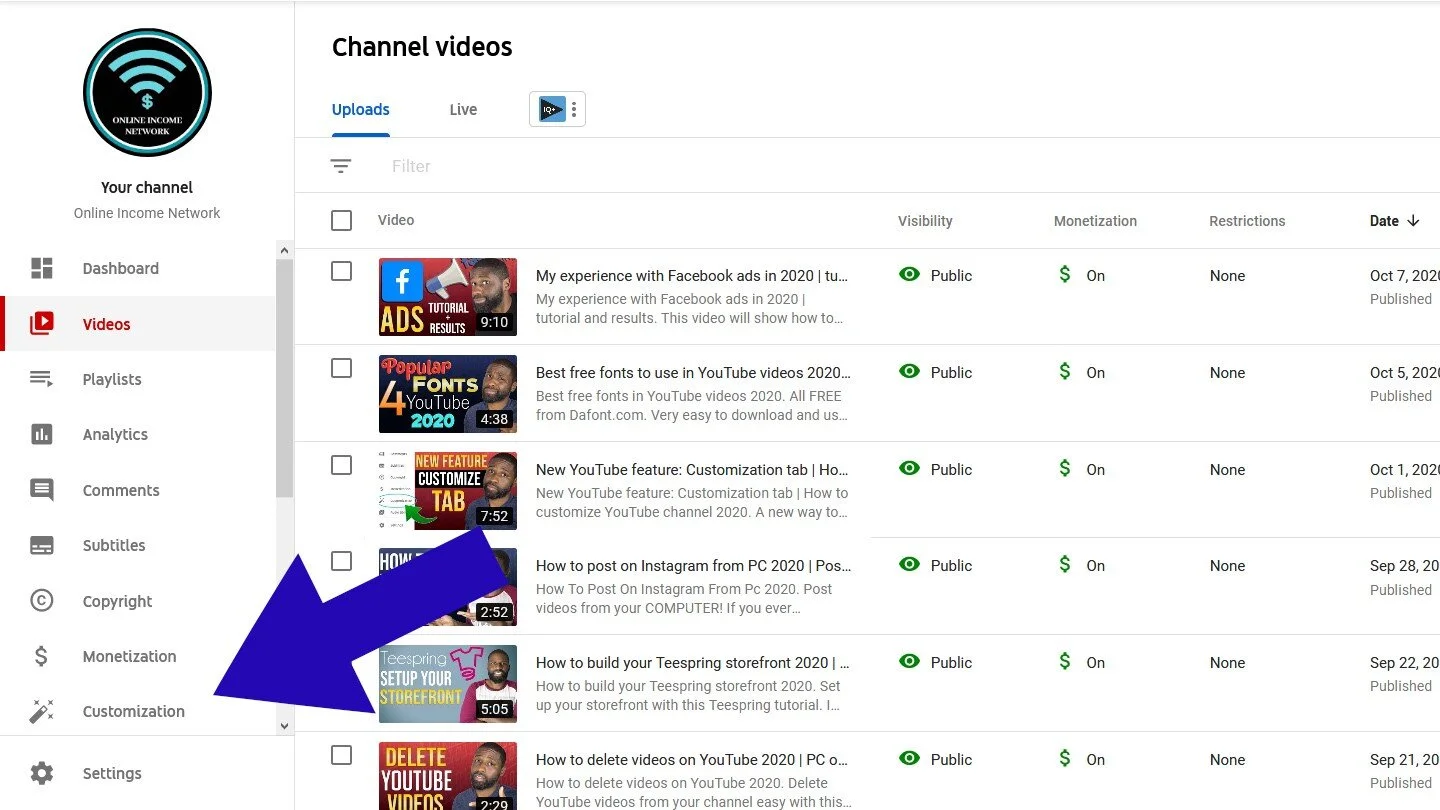
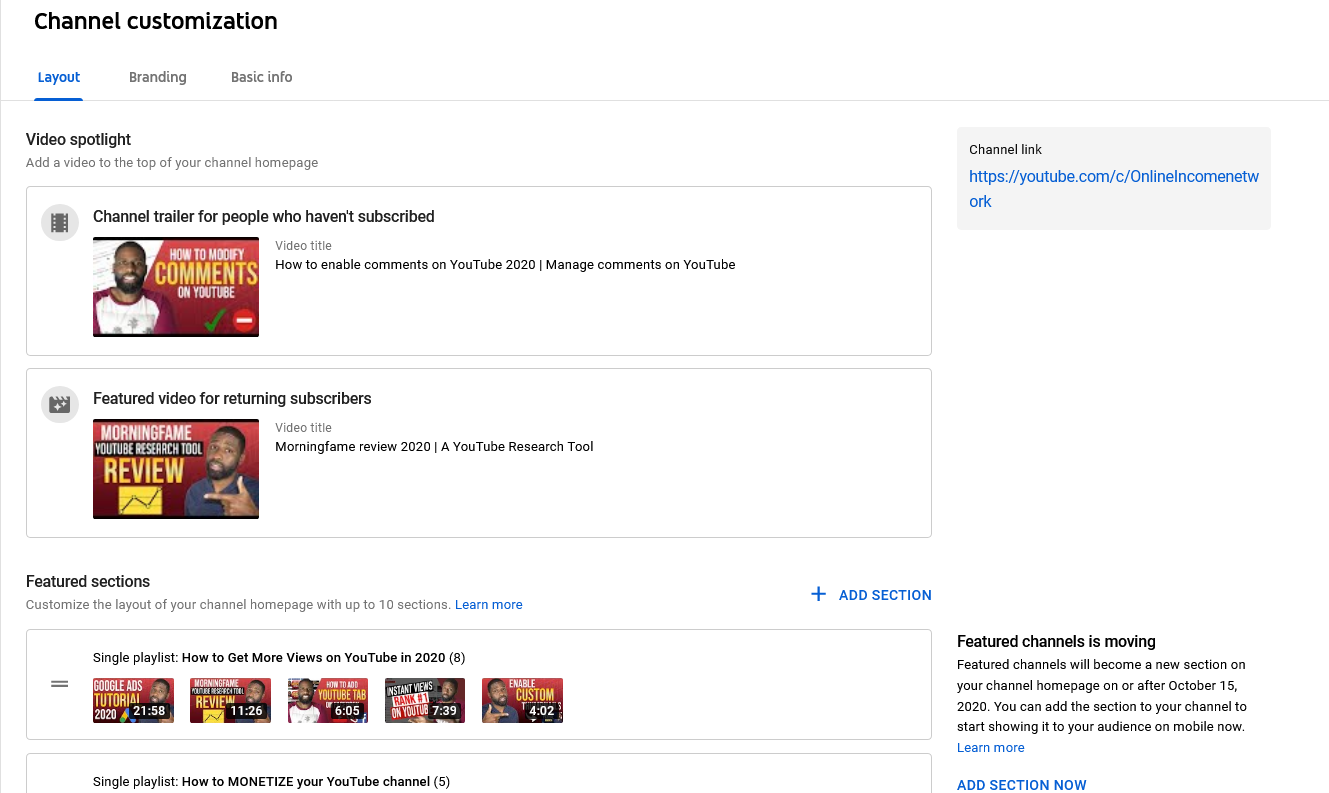
At the very top of your homepage layout in YouTube Studio (Customization > Layout), you are presented with two video slots: Channel trailer for people who haven’t subscribed and Featured video for returning subscribers.
YouTube dynamically toggles between these two states based on the visitor’s relationship with your channel. Maximizing this feature requires a distinct strategy for each slot.
The Channel Trailer (Unsubscribed Viewers)
Your channel trailer serves one primary purpose: converting new visitors into subscribers.
- Keep It Concise: Aim for 30 to 90 seconds. New visitors rarely watch multi-minute pitch videos.
- Deliver the Value Proposition: Clearly answer three questions immediately:
- What topic or niche does this channel cover?
- Who is this content made for?
- Why should the viewer subscribe today (upload schedule, unique perspective, core series)?
- Alternative Option: If you do not have a dedicated trailer video, feature your highest-converting, best-performing evergreen video instead. Choose a video that best represents your content quality and hooks viewers within the first 10 seconds.
The Featured Video (Returning Subscribers)
Subscribers who visit your channel page do not need a sales pitch; they want to know what is new or what to watch next.
Prevent Trailer Fatigue: Because YouTube automatically hides the channel trailer from active subscribers, utilizing the featured video slot ensures returning fans are greeted with fresh, relevant content rather than an intro video they have already seen.
Highlight Latest Uploads or Updates: Use this slot to promote your newest flagship release, an important channel update, or an ongoing series installment.
Step 2: Strategic Control Over the “For You” Section
In YouTube Studio, the “For You” shelf is an automated section that recommends personalized content to individual visitors based on their personal viewing history and interests.
While automated recommendations sound convenient, relying on them exclusively creates strategic drawbacks.
[ Default Automated Layout ]           [ Optimized Conversion Layout ]
┌───────────────────────────┐         ┌───────────────────────────┐
│  For You (Personalized)   │         │  Pillar Binge Playlist    │
├───────────────────────────┤         ├───────────────────────────┤
│  Recent Uploads           │   VS    │  Popular Uploads          │
├───────────────────────────┤         ├───────────────────────────┤
│  Random Playlists         │         │  "For You" Shelf          │
└───────────────────────────┘         └───────────────────────────┘
The Pros and Cons of “For You”
- Pros: Keeps the page feeling dynamic for repeat visitors by surfacing videos YouTube thinks they are most likely to click.
- Cons: Strips away your editorial control. A first-time visitor might be shown a niche video or an older experiment rather than the flagship content that best represents your brand.
Recommended Position
Do not disable the “For You” shelf entirely, but do not allow it to occupy the top spot on your homepage layout. Position it lower on the page—below your curated pillar playlists and popular uploads. This ensures new visitors see your absolute best, manually selected content first, while returning visitors still benefit from personalized suggestions as they scroll down.
Step 3: Structuring Bingeable Playlist Shelves
The core engine of homepage retention is your playlist organization. When a viewer finishes one video, a well-structured playlist shelf encourages them to click directly into a related video, extending their watch session.
To customize your shelves, navigate to YouTube Studio > Customization > Layout and click Add Section. For a broader look at how this fits into your overall account administration, explore our comprehensive YouTube channel customization guide.
Recommended Homepage Section Order for Maximum Retention
To guide visitors from entry to deep session consumption, structure your homepage sections in this order:
- Flagship Pillar Series (Single Playlist Shelf): Display your strongest, highest-quality playlist horizontally across the top shelf. This gives immediate clarity on what your channel does best.
- Popular Uploads Shelf: Social proof matters. Displaying your highest-viewed videos near the top signals authority, trust, and validation to new visitors.
- “For You” Section: Place personalized recommendations here, allowing YouTube’s algorithm to tailor content for returning viewers.
- Category Grouping (Multiple Playlists / Created Playlists): Group related series under clear section titles (e.g., “Beginner Tutorials,” “Advanced Deep Dives,” or “Product Reviews”).
- Recent Uploads or Shorts Shelf: Keep your latest uploads toward the lower-middle portion of the layout, unless your channel strategy relies strictly on daily uploads.
Step 4: Preventing “Funnel Leaks” (Hiding Liked Videos & Saved Playlists)
A “funnel leak” occurs whenever a viewer on your channel page is presented with an option that leads them away from your content. One of the most common funnel leaks on YouTube is leaving personal Liked Videos or third-party saved playlists visible on your homepage.
How Liked Videos Become Public
By default, YouTube keeps a user’s liked videos private. However, creators sometimes accidentally change their account privacy settings or manually add “Saved Playlists” and liked content to their public homepage layout via YouTube Studio shelves.
Three Reasons You Must Keep Liked Videos Hidden
1. Preventing Watch Time Loss
Your homepage should serve exclusively as a portal to your library. If a visitor lands on your channel page and clicks an intriguing video in your public “Liked Videos” shelf that belongs to another creator, they leave your ecosystem. That exit costs you potential watch time, session duration, and subscriber conversions.
2. Maintaining Professional Brand Identity
Your channel homepage is a curated professional portfolio. Personal viewing habits rarely align perfectly with your channel’s core subject matter. Having unrelated entertainment, music videos, or off-topic commentary appear on your business page dilutes your brand clarity and can look unorganized to potential sponsors or prospective subscribers.
3. Personal Privacy Protection
Separating personal YouTube consumption from channel administration is a critical best practice. Keeping liked videos private ensures your personal interests, entertainment preferences, and private viewing habits remain completely separate from your public brand.
How to Verify Privacy Settings
- Open YouTube and click your profile icon in the top right corner.
- Select Settings from the drop-down menu, then click Privacy in the left sidebar.
- Ensure the toggle for “Keep all my saved playlists private” is enabled.
- Go to YouTube Studio > Customization > Layout and review your active sections. Remove any shelf that references liked content, saved external playlists, or unintended personal collections.
Step 5: Positioning Featured Channels and External Links
The Featured Channels section allows you to highlight other YouTube channels directly on your homepage. While useful for cross-promotion, its placement requires careful consideration.
┌──────────────────────────────────────────────────────────┐
│  HOMEPAGE TOP: High-Retention Content                    │
│  • Channel Trailer / Featured Video                      │
│  • Primary Pillar Playlists                              │
│  • Popular Uploads                                       │
├──────────────────────────────────────────────────────────┤
│  HOMEPAGE BOTTOM: Exit-Point Recommendations             │
│  • Featured Secondary Channels                           │
│  • External Network Links                                │
└──────────────────────────────────────────────────────────┘
Strategic Placement for Featured Channels
- Avoid Placing Near the Top: Placing a Featured Channels shelf near the top of your layout encourages visitors to click away to another channel before they have consumed any of your videos.
- Use as an Exit Point: Position Featured Channels at the very bottom of your homepage layout. This ensures it functions as an intentional cross-promotion tool for viewers who have already scrolled through your full video library.
- Secondary Channel Strategy: If you operate a dedicated secondary channel, a podcast hub, or a short-form clipping channel, feature it clearly at the bottom of the page. Ensure your handles and channel names are aligned across both properties; read how to change your YouTube name and handle in 2026: full guide for step-by-step instructions on updating channel handles smoothly.
Complete 10-Minute Homepage Audit Checklist
Before publishing your updated channel layout, run through this quick audit to verify your homepage is optimized for maximum viewer retention:
- [ ] Channel Trailer Set: A high-energy, 30–90 second trailer is assigned for unsubscribed viewers (or your top-performing conversion video).
- [ ] Featured Video Set: A recent upload or ongoing series installment is assigned for returning subscribers.
- [ ] Pillar Playlist on Top Shelf: Your absolute best binge-worthy playlist sits immediately below the trailer slot.
- [ ] Social Proof Displayed: A “Popular Uploads” shelf is positioned in the top half of the layout.
- [ ] “For You” Shelf Repositioned: The automated recommendation section is placed below your primary manual playlists.
- [ ] Funnel Leaks Plugged: Liked videos and third-party saved playlists are hidden via Privacy Settings and layout checks.
- [ ] Featured Channels at the Bottom: Cross-promoted channels and secondary profiles are placed at the bottom as secondary exit points.
By transforming your YouTube homepage from a standard feed into a structured content funnel, you create a seamless viewer journey that turns one-time clicks into long-term subscribers and consistent channel growth.
Putting It All Together
Customizing your YouTube channel is an ongoing process. Don’t be afraid to experiment with different layouts, branding elements, and descriptions to see what resonates best with your audience.
Regularly review your channel’s appearance and make adjustments as your content and brand evolve.
By taking the time to customize your YouTube channel, you’re investing in your online presence and setting yourself up for success in the long run. So, head over to YouTube Studio and start making your channel shine!
Need more from YT Torials? Subscribe to the Newsletter!
Related Posts
YouTube Channel Customization: The Ultimate Step-by-Step Guide
Unlock Speed: 4 Ways to Create Content in Less Time
How to Move YouTube Videos to Another Channel: The Complete Migration Guide
How to Stay Consistent as a YouTube Creator
Customize your YouTube channel to look Professional
No responses yet